AI tools
8 Directions
Turn a pixel-art sprite or object to face 8 directions on one 3×3 sheet for top-down and isometric games, in one click.
8 Directions draws the same sprite facing 8 ways on one 3×3 sheet, for top-down and isometric games. It works for characters and for objects — a chest, a car, a statue turn the same way. Open a result on the Generate page and press 8 Dir next to Edit, then Create. No prompt. 5 credits.

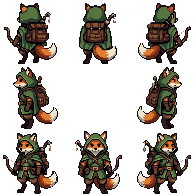
The sheet
| Row | Views |
|---|---|
| Top | back-left, back, back-right |
| Middle | left, (empty), right |
| Bottom | front-left, front, front-right |
Every view faces out from the empty centre cell. All cells are the same size, and every view stands on the same baseline, centred in its cell, so switching directions in a game doesn't make the character jump.
Press Split to assets on the sheet to save the 8 views as separate images, named after the direction, in your history and My Assets; the sheet stays. Or cut it into frames with Split Sheet in the editor.
What works
- A cut-out sprite on a transparent background; the button only shows on those.
- Up to 256 px on the longer side, at its own pixel size. The pixel size and height stay the same in every view.
- A clear front view as the source turns best; a side view works too.
Tip: Pose the character first with Edit, then turn it — every direction keeps the pose.
API and MCP
POST /v1/directions in the REST API, generate_8_directions on the MCP server. Over the API the sprite can be up to 128 px.
8 Directions
curl https://api.pixelz.io/v1/directions \
  -H "Authorization: Bearer $PIXELZ_API_KEY" \
  -H "Content-Type: application/json" \
  -d '{"image": "https://example.com/fox.png"}'