AI tools
Style Reference
Draw new items in the style, palette and outline of a reference sprite, so a whole item set looks like one artist drew it.
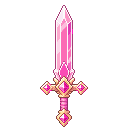
Style Reference draws a new item in the style, palette and outline of a sprite you have, so a whole set looks like one artist drew it. On the Generate page, switch the composer to Copy a sprite's style, add your sprite, type one new item, pick a size and press Create. 3 credits.


Tips
- Just name the item. “kite shield”, not “epic legendary shield”. The look comes from the reference.
- One item per sprite. Make a set one by one with the same reference.
- Use one clean sprite as the reference, not a sheet.
- Sizes: 16, 24, 32, 48, 64, 96, 128 px. Best results at the reference's size or bigger.
Tip: Make a whole item set from one sprite, then Edit any item for colour variants.
API and MCP
POST /v1/styles in the REST API, generate_in_style on the MCP server.
Style reference
curl https://api.pixelz.io/v1/styles \
  -H "Authorization: Bearer $PIXELZ_API_KEY" \
  -H "Content-Type: application/json" \
  -d '{"reference_image": "https://example.com/sword.png", "prompt": "kite shield", "size": 96}'